













SysInfo EPUB Converter for Windows
- Demo
- 4.51
- V26.0.5
Download for Windows
View an ad to download for free
All-in-One EPUB Converter with Multiple Saving Options
SysInfo EPUB Converter is a professional utility designed to help users transform EPUB eBook files into multiple widely supported formats with complete accuracy and security. The software is suitable for individuals, publishers, students, educators, and business professionals who need accessible and flexible output formats for reading, sharing, editing, printing, or archiving digital books. With an intuitive interface and advanced processing engine, the application delivers smooth conversion performance without affecting the original content structure or formatting.
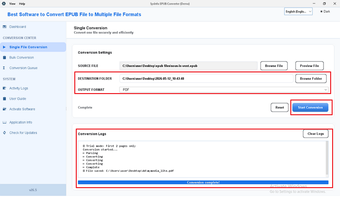
The tool supports exporting EPUB files into several document and image formats, including PDF, DOCX, TXT, JPEG, PNG, and TIFF. This flexibility allows users to open converted content on various devices and applications without compatibility concerns. Whether someone wants to read eBooks offline, edit text in a word processor, create printable documents, or store pages as images, the software provides practical output options for different requirements.
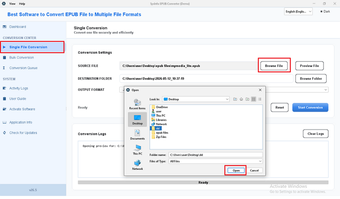
One of the major advantages of SysInfo EPUB Converter is its bulk conversion capability. Users can add multiple EPUB files simultaneously and process them together in a single operation, saving time and effort. The software maintains the original layout, text alignment, images, and formatting during the export process, ensuring that the generated files remain readable and professionally structured.
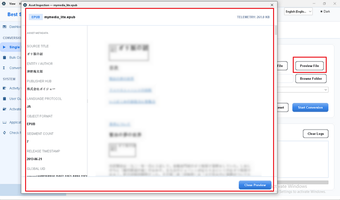
The application includes a preview feature that displays important details of selected EPUB files before conversion begins. Users can review file names, storage paths, and file sizes directly within the interface. This functionality helps organize data efficiently and reduces the possibility of processing unwanted files accidentally.
For users concerned about data privacy, the software offers advanced security settings for PDF output. Password protection can be applied to generated files, allowing users to secure confidential or copyrighted content from unauthorized access. The utility also provides options to apply a common password to all exported files or set separate passwords individually.
Another useful feature is the custom page size setting. Users can define the width and height of output pages according to personal or professional requirements. This functionality is beneficial for printing, digital documentation, and optimized viewing across different screen sizes.
SysInfo EPUB Converter also includes options for selective processing. Users can add individual files or entire folders, remove unwanted items, and manage the conversion list easily. The software supports EPUB files created from different eBook publishing applications and handles large-sized files efficiently without performance issues.
The interface is designed to be simple and user-friendly so that both technical and non-technical users can operate the application comfortably. Clear navigation and organized controls make the conversion procedure straightforward, even for first-time users.
A free demo edition is available for evaluation purposes. It allows users to test the features and conversion process before purchasing the full version. The demo version exports files with a watermark, enabling users to analyze software performance and output quality.
The software is compatible with major Windows operating systems, including Windows 11, 10, 8.1, 8, 7, Vista, and XP. With stable performance, multiple export options, file security features, and bulk processing support, SysInfo EPUB Converter serves as a practical solution for managing and converting EPUB eBook files into accessible document and image formats.
Loading…


App specs
License
Demo
Version
26.0.5
Latest update
Platform
Windows
OS
Windows NT
Language
English
Size
242.56 MB
Developer
- SysInfoTools
- More programs (23)
SysInfo EPUB Converter for PC
- Demo
- 4.51
- V26.0.5
Download for PC
View an ad to download for free
User reviews about SysInfo EPUB Converter
Have you tried SysInfo EPUB Converter? Be the first to leave your opinion!
Add reviewTop downloads Utilities & Tools for Windows
Top downloads Utilities & Tools for Windows
Top downloads Utilities & Tools for Windows
Related topics about SysInfo EPUB Converter
Latest articles

The worst nightmare of parents will have a movie. Its voice cast is absolutely incredible

The studio behind Lies of P sees AI as the future of its games and fans are not responding well

George A. Romero will finish 'Night of the Living Dead' after his death, and we know who will star in it

"A festival of nods." The first opinions of the new 'Star Wars' movie are not exactly enthusiastic

We will officially have a new James Bond, and the person in charge of finding him also found Daenerys Targaryen, Rey Skywalker, or Lady Di
Laws concerning the use of this software vary from country to country. We do not encourage or condone the use of this program if it is in violation of these laws. Softonic may receive a referral fee if you click or buy any of the products featured here.